
Author: Huang Publish Time: 20-01-2026 Origin: Site



You can change your workspace by using cct guidelines. When you use cct guidelines, you help lower stress. You also help people think better at work. Studies show that warm lighting helps people feel calm. Cool lighting helps people feel awake and ready to work. Cct guidelines give you a simple way to make people comfortable. They also help people get more work done. You should also think about things like temperature and ergonomics. This helps you make the best place to work.
Pick the right color temperature for each office space. Use 3500K in calm areas. Use 4000K in meeting rooms. Use 5000K in work zones where people focus.
Make sure lighting has a CRI of 80 or more. This helps workers see colors the right way. It also helps people do better work.
Keep UGR under 19 to lower glare. This helps stop eye strain. It makes everyone feel more comfortable at work.
Use lights that do not flicker to stop headaches. Flicker-free lights help people stay focused. They also help people work better.
Check and change your office lighting often. Ask workers what they think about the lights. This helps everyone feel good at work.
CCT guidelines help you pick the best light for your office. You can use lights from 3500K to 5000K. Each number makes a different feeling and helps workers feel better.
3500K gives off warm light. Workers feel calm and relaxed. This is good for break rooms or quiet spots.
4000K gives a neutral light. It helps people feel both comfy and focused. This is great for meeting rooms and teamwork spaces.
5000K gives cool white light. Workers feel awake and ready to work. This is best for places where people need to get things done.
You can use light panels that change. These let workers pick the light they need for each job. This helps make a workspace that is comfy and useful.
Light changes how workers feel every day. High CCT light helps workers stay awake and pay attention. It can help stop tiredness and make moods better.
Workers say they focus better and feel happier with cooler light.
6500K light helps people feel more awake and see better.
Blue-enriched light for 30 minutes a day helps mood and reaction time.
Picking the right light helps workers feel less tired and more ready to work. It also helps people work together and do better at their jobs.
You should follow important rules for office lights. These rules help keep workers safe and comfy.
| Metric | Recommended Value |
|---|---|
| CRI | 80 (standard for commercial), 90+ (preferred for retail, healthcare, residential) |
| UGR | Lower values recommended to reduce eye strain in offices |
| Flicker | Flicker-free lighting is best for employee well-being |
CRI 80 works for most work areas. It helps people see colors well for their jobs. Higher CRI is better where color is very important. UGR should be low in open offices. This helps stop glare and eye pain. Flicker-free lights are important. They help workers feel good and stop headaches.
You also meet rules like LEED and WELL when you use these tips. These rules care about saving energy, health, and wellness. You make a workspace that helps workers feel good and work together.
Tip: Use a checklist to check your office lights. Make sure you meet CCT, CRI, UGR, and flicker-free rules. Workers will feel better and get more done.
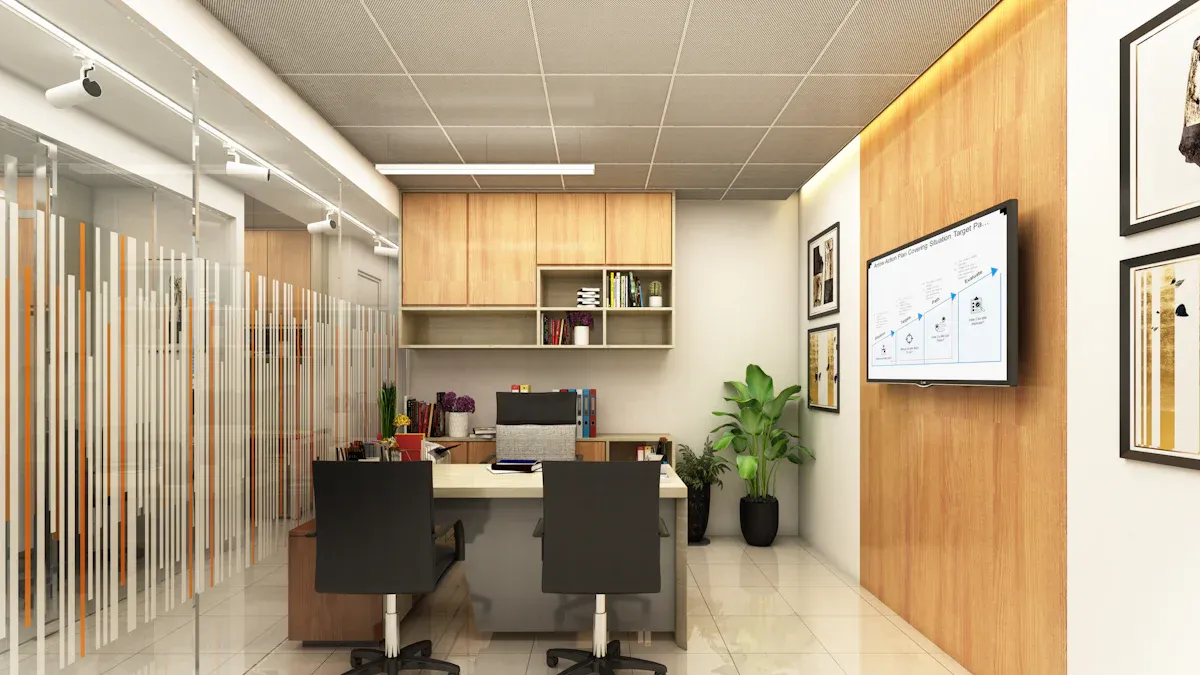
You need to start by checking the lighting in your workspace. Use light meters to measure how bright each space is. Photometers help you see how strong the light is from each fixture. Look at the color temperature in Kelvin. This number tells you if the space feels warm, neutral, or cool. For a hybrid office using LED ceiling lights, pick 3500K for calm spaces, 4000K for teamwork areas, and 5000K for focused work zones. Make sure the CRI is at least 80 so colors look true in every environment. Use a table to compare CCT and CRI for each space:
| Space Type | CCT (Kelvin) | CRI (Min) | UGR Target | Flicker-Free |
|---|---|---|---|---|
| Break Room | 3500K | 80 | <19 | Yes |
| Meeting Space | 4000K | 80 | <19 | Yes |
| Work Zone | 5000K | 80 | <19 | Yes |
Tip: Use a pilot survey template to ask workers about lighting comfort in each workspace. This helps you find areas that need improvement.
You should look at more than just lighting. Check the ergonomics of each workspace. Use ergonomic office furniture and add-ons to support good posture. Review workstations for poor seating, repetitive motions, and static postures. Try tools like the WISHA Caution Zone Checklist or Rapid Upper Limb Assessment to spot risks. Ask workers to fill out a checklist about temperature, air flow, and noise in their environment. This helps you see what changes will make the space better for everyone.
Many people in the office feel discomfort from glare and flicker. Nearly three-quarters of computer users say poor lighting affects their workspace. About 68% report digital eye strain. You should check each space for glare from screens or windows. Make sure all lights are flicker-free to protect workers from headaches. Noise also affects comfort in the environment. Use surveys to find out which areas have problems with sound or air flow. Fixing these issues helps everyone work better in the office.
Note: Regular checks and surveys help you keep your workspace healthy and productive. You can use these tools to make sure every space supports well-being.

You need to pick the best color temperature for every office space. This helps you make a workspace that is ready for the future. It also helps everyone do their jobs well. Here are some steps you can follow:
Think about how you want each space to feel. Do you want a break area that feels cozy? Should the meeting room help people stay alert? Do you want a work zone that feels full of energy?
Look at the colors in each space. If a space has blue or silver, use cooler CCTs like 5000K. If a space has wood or gold, use warmer CCTs like 3500K.
Use color temperatures from 3000K to 4000K for most office spaces. This range helps people feel comfy and focused.
Check CCTs, CRI, UGR, and flicker-free features for each space. For example, 3500K is good for break rooms. 4000K works for teamwork areas. 5000K fits work zones where people need to focus. Always pick CRI 80 or higher so colors look real. Keep UGR below 19 to stop glare. Use flicker-free lights to keep workers healthy.
Tip: Make a table to compare lighting standards for each space when you plan your office.
| Space Type | CCT (Kelvin) | CRI (Min) | UGR Target | Flicker-Free |
|---|---|---|---|---|
| Break Room | 3500K | 80 | <19 | Yes |
| Meeting Space | 4000K | 80 | <19 | Yes |
| Work Zone | 5000K | 80 | <19 | Yes |
This way, every space in your office helps people feel good and get work done.
You can make your office better by using adjustable CCT panels. These panels, like the Keou adjustable CCT panel, let you change the color temperature in each space. This makes it easy to match lighting to different jobs and designs.
Here are some best ways to use adjustable panels:
| Best Practice | Description |
|---|---|
| Fixture Placement | Put fixtures so light is even and there is no glare. Overlap light to cover all areas. |
| Lighting Audits | Check the lighting in each space. Find places that need better lights. |
| Glare Control | Use glare control to make spaces more comfy and help people work better. |
Add tunable LED panels with glare control. This helps match lighting to natural light in each space.
Change lighting to fit the time of day and type of work. This helps people feel good and work well.
Use lighting audits to see if each space meets CCT, CRI, UGR, and flicker-free rules.
Adjustable CCT panels can save up to 60% energy compared to old fluorescent tubes. The panels last over 50,000 hours. You spend less time and money changing them. This makes your office more efficient and better for the planet.
Note: Keou adjustable CCT panels help you use one product for many spaces. This makes planning your office easier.
Using the same lighting products is important for a good office fit-out. Selectable CCT panels, like the Keou model, let you use one product in many spaces. This makes planning simple and helps you get ready for the future.
Here are some benefits of using the same products:
You use parts that work in many places. You need less inventory for your office.
Repairs are easier. You fix parts instead of changing whole fixtures. This means less downtime.
Fewer SKUs help you fix problems faster. Maintenance teams work better.
Using the same lighting makes stocking and training easier for staff.
The same products in every space help workers stay safe and do their jobs well.
Standardized lighting helps you reach sustainability goals. You use good task and ambient lighting in every space. High-quality fixtures with the right color temperature help people feel comfy and work better. Smart lighting controls save energy and help people stay healthy.
| Facility Type | Cost per Sq Ft | Primary Cost Drivers |
|---|---|---|
| Standard Warehouse | $3.00-4.50 | High-bay fixtures, basic controls |
| Manufacturing Plant | $4.00-6.00 | Mixed fixture types, zone controls |
| Food Processing | $5.00-7.00 | Washdown-rated fixtures, specialized mounts |
| Pharmaceutical/Cleanroom | $6.00-8.00+ | Compliance, validation documentation |
| Cold Storage | $5.50-7.50 | Temperature-rated, sealed fixtures |
You can see that lighting costs change by space type. Using the same products helps you control costs and follow rules in every space.
Tip: Use the same lighting products in your office to make workspaces flexible and ready for the future. This makes planning easier and faster.
Adjustable CCT panels, like Keou, help you use fewer SKUs. You can use one panel in many spaces. This makes your office more flexible and less complicated. Selectable CCT panels make planning simple and work well. You meet all lighting rules for every space, like CRI 80 or higher, UGR less than 19, and flicker-free lights. This helps your office support well-being, productivity, and sustainability.

You can make your office more comfortable by changing how it is set up. Pick ergonomic chairs and desks that help you sit up straight. These help your body and stop pain. Put desks close to windows so you get natural light. This helps your eyes feel better. Use lights that you can adjust, like 3500K, 4000K, or 5000K CCTs. Change the light for different jobs and times of day. Pick lights with CRI 80 or higher. Make sure they have low UGR and do not flicker. This helps everyone feel good at work. Try these steps to make your workspace better:
Watch how you work and see what feels uncomfortable.
Check how much effort and movement your tasks need.
Look for things like bad posture or doing the same thing a lot.
Pick ergonomic furniture to help stop injuries.
Try new setups and see if comfort gets better.
Keep notes about comfort and how people feel over time.
Comfort in your office is about more than just lights. You need to control temperature, noise, and air quality. Keep the temperature close to 71.6°F. Use quiet machines so noise stays under 35 dB(A). Make sure the air is fresh. Keep CO2 below 800 ppm and PM2.5 under 5 µg/m3. Open windows when you can to let in fresh air. Put plants in the office to clean the air and make it feel nice.
| Parameter | Recommended Level |
|---|---|
| Temperature | Around 71.6°F (21°C) |
| Noise Level | Below 35 dB(A) |
| CO2 Levels | Below 800 ppm |
| PM2.5 Levels | Below 5 µg/m3 |
Tip: Use a checklist to watch temperature, noise, and air in your office.
You can help people feel better by adding plants and natural things to your office. Put plants on desks and in corners to make the space look nice. Studies show offices with plants help people work 15% better and feel 60% less stress. Natural things like wood or stone help people feel calm. Sunlight and green plants lower stress and tiredness. Plants also clean the air and make the office healthier.
| Study/Source | Finding |
|---|---|
| Journal of Experimental Psychology: Applied (2014) | Offices with lots of plants helped people work 15% better than offices with few plants. |
| University of Technology Sydney | Offices with plants had up to 60% less stress. |
| Environmental Psychology Studies | Green plants inside lowered tension by 37%, depression by 58%, and tiredness by 38%. |
Seeing plants inside lowers stress and helps people feel good.
Sunlight and natural things help people feel happy at work.
Green plants clean the air and help everyone feel comfortable.
You can make your office a place where people feel good and work well by using sunlight, comfy furniture, and natural decor.

You can make your office better by using easy tips. Try to keep the light bright but also comfortable. Use diffusers or indirect lights to stop glare. This helps everyone see well. Pick CCTs for each area based on the work done there. Break rooms should use 3500K for a warm feeling. Meeting rooms do best with 4000K, which feels neutral. Work zones need 5000K to help people stay alert. Always choose lights with CRI above 80 so colors look real. Keep UGR low to stop eye strain. Flicker-free lights help people feel good and work longer.
Add tunable white lighting systems. These let you change CCT and brightness for different jobs.
Use daylighting with big windows or skylights. Natural light helps people feel happy and work better.
Put fixtures so light spreads evenly in the office.
Tip: Check your lighting often. Ask workers how they feel about the light in their space.
Many offices make mistakes with lighting. You can stop these problems by looking out for common issues.
Not checking lighting can make it hard to see and cause discomfort.
Putting fixtures in the wrong place causes glare and uneven light.
Using lights with low CRI makes colors look dull and hurts work quality.
Ignoring flicker can give people headaches and lower how much work gets done.
Forgetting about UGR can cause eye strain and make workers tired.
If you pick the right CCT, CRI, and UGR for each area, you help everyone work better and feel comfortable.
You need to keep checking your office lighting to meet changing needs. Smart lighting systems can change brightness and CCT during the day. This helps match natural daylight and supports healthy sleep. You can control these systems from far away and set up different lighting for each job.
Check lighting often. Ask workers for feedback and make changes when needed.
Use sensors to change lighting based on time of day and natural light.
Match ambient lighting for teamwork spaces and focused lighting for workstations.
Smart lighting systems use sensors and software to change light levels and color temperature. This keeps your office comfy and saves energy.
| Lighting Feature | 3500K | 4000K | 5000K | CRI ≥80 | UGR <19 | Flicker-Free |
|---|---|---|---|---|---|---|
| Break Room | ✔ | ✔ | ✔ | ✔ | ||
| Meeting Space | ✔ | ✔ | ✔ | ✔ | ||
| Work Zone | ✔ | ✔ | ✔ | ✔ |
You can help everyone work better and feel good by using the right lighting and making regular changes.
You can make your office better by using CCT guidelines. Pick 3500K for calm rooms. Use 4000K for balanced spaces. Choose 5000K for work areas where people need to focus. Always use lights with CRI 80 or higher. Pick lights with low UGR and no flicker. These choices help people feel comfortable and safe. When you do this, people work better and feel good. Companies see workers enjoy their jobs more. People feel safe and important at work. Offices help everyone grow and stay healthy.
| Benefit Type | Description |
|---|---|
| Job Satisfaction | Workers feel happy and like their jobs. |
| Psychological Safety | People feel safe and respected in the office. |
| Sustainable Workplaces | Offices help everyone do well and feel good. |
Keep checking your office lighting and change it when needed. This helps people want to work and do their best.
Remember, making your office better starts with you.
You should choose CCT based on the space. Use 3500K for break rooms, 4000K for meeting spaces, and 5000K for work zones. Each CCT creates a different mood. Warm light feels relaxing. Cool light helps you stay alert.
CRI shows how well you see colors. You need CRI ≥80 for most office tasks. High CRI helps you see details and reduces mistakes. If you work with colors, pick lights with CRI 90 or higher.
UGR measures glare. Lower values mean less glare and more comfort. You should keep UGR below 19 in offices. This helps you avoid eye strain and headaches.
Flicker-free lights do not flash quickly. You may not see flicker, but it can cause headaches and tired eyes. Always pick flicker-free lights for your workspace.
| CCT | Mood | Best For |
|---|---|---|
| 3500K | Warm, calm | Break rooms |
| 4000K | Neutral | Meeting spaces |
| 5000K | Cool, alert | Work zones |
You can mix these CCTs to match each area’s needs.


