Author: LD Publish Time: 17-09-2026 Origin: Site


Prolonged academic reading and intensive study sessions carry a heavy physical toll. Visual fatigue, tension headaches, and a steady decline in concentration often disrupt even the most disciplined routines. Students and professionals frequently invest heavily in ergonomic chairs, standing desks, and premium monitors to optimize their workspaces. Yet, lighting remains a consistently overlooked factor in workspace ergonomics. Poor lighting directly degrades cognitive endurance. It slows reading comprehension speed and compromises long-term ocular health.
Selecting the best Light for Studying is not a subjective aesthetic choice. It requires a strict technical evaluation based on measurable optical metrics. Upgrading your workspace means understanding and applying specific standards for Color Rendering Index (CRI), color temperature measured in Kelvin, and illuminance measured in Lux and Lumens. Proper illumination turns a fatiguing environment into a high-performance workspace.
Optimal Temperature: The most effective study environments utilize cool white light in the 4000K to 5000K range to promote alertness without causing the harsh glare associated with daylight-calibrated (6000K+) bulbs.
Color Accuracy Matters: A Color Rendering Index (CRI) of 90 or higher is non-negotiable for reading physical texts and reducing visual processing strain.
Layered Illumination: Relying on a single light source creates high-contrast shadows and eye fatigue; a dual approach combining ambient room lighting with targeted task lighting is required.
Adjustability is Key: Because study schedules often extend into the evening, lighting must be adjustable (dimmable and temperature-variable) to prevent circadian rhythm disruption prior to sleep.
When you read in a poorly lit room, the ciliary muscles inside your eyes work overtime. They constantly adjust the lens to maintain focus on small text. This sustained muscular contraction leads directly to the dull, aching sensation behind the eyes. We call this asthenopia, or eye strain. High-contrast environments make this physical strain much worse.
Picture a bright desk lamp illuminating a textbook while the rest of the room stays pitch black. Every time you look up from the page to process information, your pupils rapidly dilate to adjust to the darkness. When you look back down at the bright page, they forcefully constrict. This constant pupillary micro-adjustment fatigues the sphincter pupillae muscles rapidly. Over a few hours, you get blurred vision, dry eyes, and tension headaches.
To prevent these symptoms, you need baseline success criteria for your study lighting setup:
Uniform light distribution across the entire visual field to minimize pupillary adjustments.
Complete absence of low-frequency flicker to prevent neurological fatigue.
Appropriate brightness levels that illuminate the task without overpowering the ambient environment.
Light spectrums wield direct biological control over human alertness. The human circadian rhythm relies on light cues to regulate melatonin production. Melatonin is the hormone responsible for inducing sleep. Photoreceptors in the eye, specifically intrinsically photosensitive retinal ganglion cells (ipRGCs), are highly sensitive to short-wavelength light. This is the blue and cool-white spectrum prevalent in natural daylight.
Exposure to cool light during daytime study sessions suppresses melatonin secretion. Simultaneously, it stimulates the release of cortisol. This hormonal shift heightens alertness, improves reaction times, and sustains cognitive focus. Mimicking daylight through artificial lighting tricks the brain into maintaining a state of active wakefulness. You absorb complex academic material much faster when your biology supports your effort.
However, maintaining high-alertness lighting during late-night study sessions presents severe trade-offs. Prolonged exposure to blue-enriched light after sunset disrupts the natural circadian phase. It might keep you awake to finish a chapter, but it delays sleep onset and degrades sleep architecture. You lose out on the memory consolidation that occurs during deep sleep. This ultimately undermines the primary goal of studying.
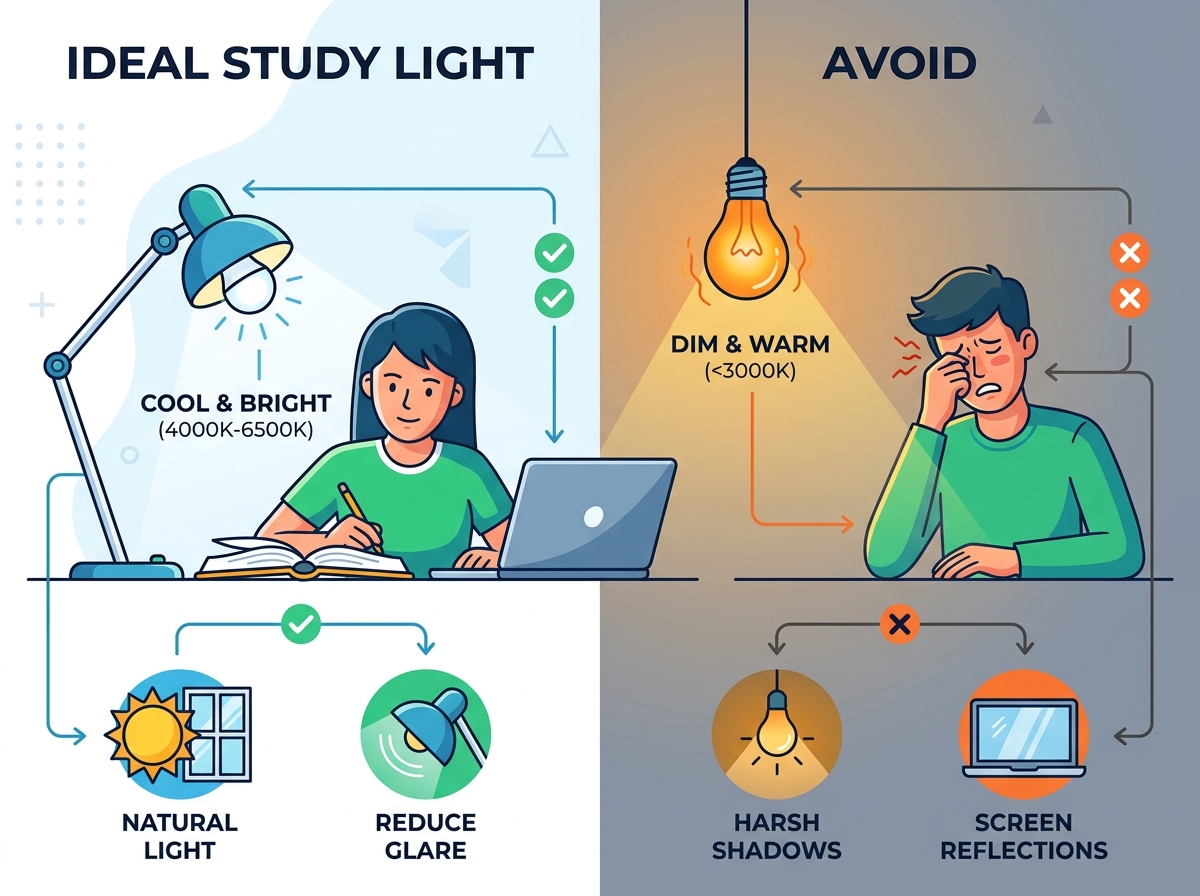
Natural daylight provides unmatched psychological and biological benefits for sustained focus. Sunlight delivers continuous, full-spectrum illumination that artificial bulbs struggle to replicate perfectly. Access to daylight reduces cortisol spikes associated with stress while maintaining the baseline alertness required for rigorous mental tasks.
Spatial setup dictates how effectively you harness this resource. Position your desk perpendicular to windows rather than facing them directly. A perpendicular arrangement captures ambient daylight across your workspace. It prevents the harsh, direct glare that washes out computer screens when you face a window. It also eliminates the heavy shadows cast over your desk when a window sits directly behind you.
Balancing natural and artificial sources requires active management. Sunlight is dynamic. As the sun shifts or clouds pass, the lux level on your desk fluctuates. Use LED task lighting to fill in shadows and maintain a consistent illumination baseline. This prevents sudden drops in brightness that force your eyes to constantly readjust. When natural light is entirely unavailable, utilize full-spectrum LED bulbs designed to mimic daylight curves to maintain cognitive momentum.
The Kelvin (K) scale measures the color temperature of light. Lower numbers indicate warmer, yellow-toned light. Higher numbers indicate cooler, blue-toned light. Understanding this scale is fundamental to engineering a productive workspace.
Standard temperature ranges serve distinct biological purposes. Warm light (2700K-3000K) promotes relaxation and prepares the brain for rest. Neutral to Cool White light (4000K-5000K) stimulates the brain for active studying and analytical tasks. Daylight calibration (6000K+) is generally reserved for industrial tasks, medical facilities, or high-precision mechanical work where extreme contrast is necessary.
For high-stakes exam preparation, the 4000K-4500K range represents the absolute sweet spot. This specific white light mimics mid-day cognitive stimulation. It provides enough blue-spectrum energy to keep you alert without the harsh, clinical glare of 6000K bulbs. It is the ideal Light for Studying because it sustains hyper-focus while remaining comfortable for hours of continuous reading.
Color Temperature (Kelvin) | Light Appearance | Biological Effect | Ideal Use Case |
|---|---|---|---|
2700K - 3000K | Warm White / Yellow | Melatonin production, relaxation | Pre-sleep reading, casual review |
4000K - 4500K | Neutral White | Sustained alertness, focus | Active studying, exam preparation |
5000K - 5500K | Cool White | High energy, sharp contrast | Detailed drafting, daytime focus |
6000K+ | Daylight / Blue-White | Extreme alertness, potential strain | Industrial work, short-term tasks |
Color Rendering Index (CRI) measures how accurately a light source reveals the true colors of objects compared to an ideal or natural light source. While often associated with professional photography, CRI is a critical ergonomic metric for academic environments.
Low-CRI bulbs (under 80) emit an incomplete light spectrum. When this light hits physical paper, it washes out the contrast between the black ink and the white page. The text appears slightly gray or muddy. Because the contrast is degraded, the brain must dedicate more neurological resources to decode the letters. This micro-strain accumulates rapidly during a three-hour reading session.
Establishing a CRI of 90 or higher is a mandatory specification when evaluating desk lamps or overhead bulbs. High-CRI lighting renders text with razor-sharp contrast. It makes highlighters, color-coded notes, and textbook diagrams pop with clarity. This reduces the cognitive load of visual processing, leaving more mental energy for actual comprehension.
Understanding the distinction between Lumens and Lux prevents common lighting mistakes. Lumens measure the total amount of visible light emitted from a source in all directions. Lux measures the actual light intensity hitting a specific surface area. One lux equals one lumen per square meter.
Industry-standard benchmarks dictate that a dedicated study desk requires approximately 500 to 1,000 Lux for reading and writing. Dropping below 500 Lux forces the eyes to strain. Exceeding 1,000 Lux on white paper creates blinding reflection and glare.
Translating this target to bulb specifications requires accounting for the distance between the lamp and the desk. For a standard articulating desk lamp positioned 15 to 18 inches above the work surface, you need a task lamp outputting between 450 to 800 Lumens. This output range reliably delivers the required 500-1000 Lux onto the textbook or notebook without overwhelming the immediate environment.
Lamp Height from Desk | Required Lumens | Estimated Lux on Surface |
|---|---|---|
12 inches | 300 - 450 Lumens | 500 - 750 Lux |
18 inches | 450 - 800 Lumens | 500 - 850 Lux |
24 inches | 800 - 1200 Lumens | 500 - 900 Lux |
Relying on a single light source is a fundamental ergonomic failure. Layered lighting divides illumination into three distinct categories: Ambient (general room light), Task (focused desk light), and Accent (background or bias lighting). Integrating all three creates a seamless visual environment.
Balancing the contrast ratio is the primary goal of layering. If your computer monitor is brilliantly bright, your desk surface is moderately lit, and the surrounding room is dark, your eyes will fatigue rapidly from constant adaptation. Ambient lighting from ceiling fixtures raises the baseline brightness of the room. Task lighting elevates the lux level specifically on your reading materials. Accent lighting, such as an LED strip behind a monitor, softens the harsh edge between the bright screen and the dark wall behind it.
Actionable setup advice begins with lamp placement. Always place your primary task light opposite your dominant hand. If you are right-handed, position the lamp on the left side of the desk. This prevents your hand and arm from casting moving shadows over your writing materials. Moving shadows are a common source of subconscious visual distraction.
Articulating desk lamps, often called architect lamps, provide utility that fixed overhead lighting cannot match. The primary advantage of a dedicated desk lamp is proximity and control. By bringing the light source closer to the work surface, you achieve the necessary lux levels without requiring massive lumen output from the ceiling.
Evaluate features based on their direct outcomes. Goosenecks and multi-axis swing arms allow for precise lux control. If a textbook has glossy pages, an articulating arm lets you adjust the angle of incidence instantly to eliminate veiling reflections. You can pull the light low for intense focus or push it high to wash the entire desk in softer light.
When selecting a dedicated desk lamp, consider the mounting mechanism. Weighted bases offer portability but consume valuable desk real estate. Clamp-style mounts secure directly to the edge of the desk, freeing up surface area for textbooks and notebooks. This is particularly useful for drafting tables or compact dorm desks where every square inch matters. The mechanical friction joints on high-quality architect lamps ensure the light stays exactly where you position it, unlike cheaper gooseneck models that tend to droop over time.
Relying solely on ceiling fixtures presents severe limitations. Overhead lights cast shadows downward. When you lean over a desk to write, your own head and shoulders block the ambient light, plunging your work area into shadow. Furthermore, achieving 500 lux on a desk surface from a ceiling fixture eight feet away requires an exceptionally bright bulb that often causes glare across the rest of the room.
Modern study sessions are heavily digital. Monitor light bars have emerged as a highly effective solution for screen-centric workflows. These devices mount directly to the top bezel of a computer monitor and project light downward onto the desk.
The core benefit of a high-quality monitor light bar is its asymmetrical optical design. Unlike a standard bulb that throws light in 360 degrees, a light bar uses internal reflectors to direct light strictly forward and down. This illuminates the keyboard and desk surface perfectly without casting a single ray of light onto the monitor glass. It completely eliminates screen glare.
Assess scalability and spatial compliance. Light bars are ideal for small dorm desks, cramped apartment workspaces, or multi-monitor setups where a traditional heavy-base desk lamp consumes too much valuable footprint. They provide professional-grade task lighting while requiring zero desk space.
Investing in smart LED systems introduces a layer of automation to workspace ergonomics. Systems that allow for programmatic control over color temperature and brightness offer significant biological advantages for serious students and professionals.
The primary value lies in automated temperature shifting. You can program a smart bulb to output a crisp 4500K at 2:00 PM for maximum alertness. As the evening progresses, the system can automatically shift to a warm 2700K by 9:00 PM. This protects sleep hygiene by eliminating blue light exposure well before bedtime, without requiring manual intervention.
Address implementation risks before upgrading. Smart systems require a stable Wi-Fi network or dedicated hub to function seamlessly. More importantly, budget-tier smart bulbs often utilize low-frequency Pulse Width Modulation (PWM) to achieve dimming and color shifting. This introduces invisible flicker. Always verify the technical specifications of adaptive systems to ensure they maintain high CRI and flicker-free operation across all color temperatures.
Utilizing optimal study lighting too close to bedtime triggers negative biological outcomes. The cool, blue-enriched light that powers afternoon focus becomes a liability at night. It actively suppresses melatonin production, signaling to the brain that the sun is still up.
Students who study under 4500K light until midnight frequently report lying awake in bed for hours afterward. This delayed sleep phase prevents the brain from entering the deep REM cycles required to consolidate the information just studied. Recommend a hard cut-off time. Implement a transition protocol that shifts all workspace lighting to a warm temperature (under 3000K) at least 90 minutes before sleep. This allows natural melatonin secretion to begin.
Improper lamp placement causes veiling reflections. This occurs when a light source bounces off a screen or glossy surface directly into your eyes, obscuring the text beneath a layer of white glare. This forces you to squint or shift your posture awkwardly to read.
Evaluate your desk and material surfaces. Glossy textbooks, glass-topped desks, laminated notes, and tablet screens are highly reflective. If a desk lamp points straight down at a glossy page, the light bounces straight back up. Angle the task lighting slightly away from you, so the light hits the page and reflects away from your face.
Modern laptops and tablets often feature glossy screens that act like mirrors under direct light. If you use a tablet for digital note-taking, a standard desk lamp will almost certainly create a blinding hotspot on the glass. Applying a matte screen protector diffuses this reflection, spreading the light out and reducing the peak intensity of the glare. Combine this physical modification with proper lamp angling for the best results.
Use this diagnostic checklist to test your setup for hidden glare sources:
Turn off your monitor but leave the desk lamp on to check for bright spots on the black screen.
Place a mirror flat on your textbook or notebook.
Sit in your normal reading posture and look at the mirror.
If you can see the bulb in the mirror, adjust the lamp angle until the bulb disappears.
Pulse Width Modulation (PWM) is a technique used by manufacturers to dim LED lights. Instead of lowering the actual power, the circuitry turns the LED on and off rapidly. In high-quality lamps, this strobing happens at thousands of times per second, rendering it completely invisible and harmless.
In budget LED lamps, this flicker occurs at much lower frequencies. While you may not consciously see the light flashing, your optic nerve detects it. The pupillary muscles attempt to adjust to the micro-fluctuations in brightness. Over a long study period, this invisible flicker causes severe tension headaches, nausea, and rapid eye fatigue.
If you suspect your current lamp suffers from low-frequency flicker, you can perform a simple test using your smartphone camera. Turn the lamp on in a dark room. Open your phone's camera app and point it directly at the light source. If you see dark bands scrolling vertically or horizontally across your screen, the lamp uses low-frequency PWM. This strobing effect is exactly what your optic nerve processes during a study session. Replace any lamp that fails this smartphone camera test immediately.
Always verify flicker-free certifications when purchasing lighting hardware. Look for products that explicitly state they use direct current (DC) dimming or high-frequency PWM. If a manufacturer does not advertise flicker-free technology, assume the product uses low-frequency PWM and avoid it for rigorous academic use.
The best lighting setup is a carefully calibrated environment featuring a 4000K-5000K color temperature, a CRI of 90 or higher, and a layered approach to illumination. By treating lighting as a critical component of your ergonomic setup, you protect your visual health and extend your cognitive endurance. When shortlisting a study lamp, demand specific technical criteria like an adjustable arm, variable color temperature, a minimum output of 500 lumens, and verified flicker-free certification.
Take immediate action to optimize your workspace with these next steps:
Audit your current study space by checking the specifications printed on your existing bulbs.
Adjust your lamp placement to the side of your dominant hand to eliminate writing shadows.
Upgrade to a high-CRI, adjustable task light if you routinely experience visual fatigue or tension headaches after reading.
Implement a hard cut-off time for cool white light 90 minutes before sleep to protect your circadian rhythm.
A: The optimal LED color for studying is a cool white light in the 4000K to 5000K range. This specific color temperature mimics mid-day sunlight, which naturally suppresses melatonin and stimulates cortisol production. It promotes sustained alertness and focus without causing the harsh glare associated with 6000K daylight bulbs.
A: Cool light (4000K-5000K) is vastly superior for active studying, note-taking, and information retention because it keeps the brain alert. Warm light (2700K-3000K) is better suited for casual, relaxed reading before bed, as it allows natural melatonin production to occur, preparing your body for sleep.
A: A dedicated task lamp should output between 450 and 800 lumens. When positioned 15 to 18 inches above the desk, this lumen output translates to roughly 500 to 1000 lux hitting the work surface. This is the industry standard intensity required for detailed reading and writing without causing glare.
A: Yes, a Color Rendering Index (CRI) of 90 or higher is essential. High CRI ensures that black text contrasts sharply against white paper. Low CRI bulbs wash out colors and make text appear muddy, which increases the cognitive load of visual processing and accelerates eye strain during long sessions.
A: Monitor light bars are highly effective, particularly for digital-first studying. They utilize an asymmetrical optical design that directs light downward onto the desk surface and keyboard. This illuminates your physical workspace perfectly without casting any reflections or glare onto the computer screen.
A: Yes, poor lighting is a primary trigger for tension headaches. Low-frequency LED flicker forces the eyes to constantly readjust, while high-contrast glare fatigues the ocular muscles. Combined with the strain of decoding low-contrast text in dim environments, these factors rapidly induce severe headaches and visual fatigue.